Live TV Player EXO or VLC: Comparison
Performance and Latency Considerations
If you think about performance and latency in a live TV app - then ExoPlayer and VLC work in absolutely different ways.
ExoPlayer is made by Google corporation and built for Android platform. It supports top streaming protocols like HLS, MPEG-DASH and SmoothStreaming right out of the box. It’s a top for apps that need adaptive streaming and cloud delivery.
Remember that ExoPlayer can be a bit slower to start a live stream. Sometimes you need a few seconds to show the first frame, but it depends on how buffering is set up and what the network is like.
VLC usually starts playback faster because it decodes streams right away. It can handle different formats without needing Android-specific tweaks at all.
Buffering works differently also. Using ExoPlayer you can adjust buffer sizes and how it loads data, it helps if your network isn’t stable. VLC mostly uses its own internal buffering, and you don’t get as much control.
Tip for live streaming apps:
- In ExoPlayer, adjusting the LoadControl buffer settings can significantly reduce startup delay and playback stalls.
- For ultra-low latency live streams (for example sports), developers may also use low-latency HLS or DASH configurations.
Exo Player Built for Custom Streaming Solutions
ExoPlayer is more than just a player - more like a toolkit for building your own media playback. Possible to customize almost everything about how it works.
Key capabilities include:
- Adaptive bitrate streaming using HLS or MPEG-DASH
- Digital Rights Management (DRM) support (Widevine, PlayReady)
- Advanced track selection for subtitles, audio tracks, and video quality
- Custom renderers and decoders
- Fine-grained buffering control
- Offline playback and content download support
- Seamless integration with Android Media3 libraries
Adaptive streaming means a lot for live TV. It changes the video quality on the fly based on your connection, so you get smooth playback without annoying pauses.
Exo Player gives possibility to track things like bitrate changes, dropped frames, or buffering, which is handy if you want to see how your app is performing.
Advanced developer advantage:
- Custom ad insertion (IMA SDK integration)
- Picture-in-Picture (PiP) playback
- Making dynamic overlays and subtitles
- Server-side ad insertion workflows
VLC provides Universal Format Compatibility
VLC plays almost any format. You don’t need to install extra codecs no more, it just works with most audio and video files.
That’s because VLC comes with its own decoding libraries that are built in.
Some notable capabilities include:
- Support for a very wide range of codecs and containers from the box
- Playback of DVD, Blu-ray and network streams and more
- Built-in audio equalizer and filters
- Frame-by-frame playback and video snapshot capture
- Video effects such as rotation, zoom, and overlays
- Ability to convert or record streams
If your hardware supports it, VLC can even tune into digital TV broadcasts like DVB-C, DVB-T, and DVB-S.
For IPTV and live streams, VLC is a popular pick since it can handle M3U playlists, RTSP, UDP, or multicast streams with almost no setup.
Ease of Integration and Developing Workflow of players
Exo media Player Integration
Exo Player integrating in Android apps using the official SDK and Media 3. Since Google maintains it - it keeps up with Android updates too.
Advantages for developers include:
- Tight integration with Android lifecycle components for a long period
- Consistent user interface components such as PlayerView
- Good support for Android TV and Chromecast
- Continuous updates and performance improvements for long period
Because ExoPlayer is also customizable you might have to do more work to get things just right. You may need to build things like:
- Custom user interface controls
- Custom network and data sources
- DRM license handling
But if you want a streaming app that does exactly what you need, the extra effort is worth it.
VLC Integration possibilities
VLC can be integrated through libVLC bindings, available for several programming languages such as Java, Kotlin, C++ and Python and even more.
Key advantages include:
- Cross-platform compatibility (Android, Windows, Linux, macOS, iOS)
- Mature open-source ecosystem
- Ability to reuse the same playback engine across different platforms
One thing you should keep in mind is that libVLC doesn’t come with a built-in UI and it means you’ll usually have to make your own. Depending on your project that could be a plus or a minus.
Cross Platform Supporting
ExoPlayer
- Primarily designed for Android
- Used by many Android apps including streaming platforms
- Optimized for Android hardware acceleration
VLC
- Fully cross-platform
- Runs on desktop, mobile and embedded systems
- Consistent playback engine across environments
So if you want to build an IPTV or media app that runs everywhere then VLC is a strong choice.
Resource Usage and Battery Consumption
Performance also depends on what kind of device you’re running.
ExoPlayer advantages
- Optimized hardware decoding on Android devices
- Better integration with Android power management
- Efficient memory usage when properly configured
VLC advantages
- Handles unusual codecs and streams better
- Reliable for legacy formats or poorly encoded files
But since VLC handles so many codecs on its own, it can use more CPU during heavy decoding.
Real-World Streaming Use Cases
Different scenarios may favor one player over the other.
IPTV Apps
VLC often works well with IPTV because it supports M3U playlists, multicast streams, and many network protocols out of the box.
OTT Streaming Platforms
ExoPlayer is commonly used in professional streaming apps where features like DRM, adaptive bitrate streaming, analytics, and advertising integration are essential.
Smart TV Applications
Both players are widely used in smart TV apps, where the media player handles decoding, rendering, and interaction with the streaming infrastructure.
Developer Tips for Live TV Player EXO and VLC
If you are building a live TV application, here are some useful optimization strategies:
ExoPlayer Tips
- Tune buffer durations for faster live playback
- Use low-latency HLS or DASH
- Enable hardware decoding whenever possible
- Implement playback analytics to monitor buffering events
VLC Tips
- Use libVLC caching settings to reduce startup delay
- Optimize stream transport (UDP vs HTTP)
- Handle subtitle rendering carefully for performance
Suitability for Live TV Streaming Applications for Player EXO or VLC
Choosing between ExoPlayer and VLC ultimately depends on the needs of your application.
ExoPlayer is ideal when:
- You need adaptive streaming
- DRM protection is required
- Deep Android integration is important
- You want fine-grained playback control
VLC is ideal when:
- Maximum format compatibility is required
- Startup speed is critical
- You want a cross-platform playback engine
- You need support for unusual or legacy codecs
Both ExoPlayer and VLC are good choices for live TV streaming on Player EXO or VLC. Exo Player is better if you want a customizable Android experience. VLC perfect for playing almost any format and working across different platforms.
In the end, your choice comes down to what matters most for your app:
- Low latency startup
- Advanced streaming features
- Codec compatibility
- Ease of integration
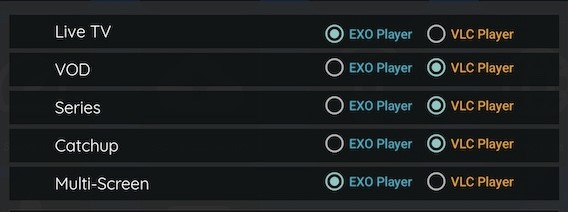
Some apps can support both players and users can choose whichever works best for their content or device.